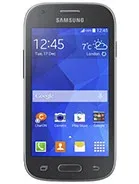
Samsung GALAXY ACE style is a samsung device (codename: sm-g310hn). FirmwareMirror hosts 9 verified firmware builds, covering: MOT, ATO, PRO, NEE, BTU. Available as official firmware. Last updated: 2026. All files MD5-verified. Free, no registration.
Find and download official Stock ROM for Samsung GALAXY ACE style (sm-g310hn). All firmware files include MD5 hash verification and are available for direct download.
| Version | Method | Size | Release Date | MD5 Hash | Download |
|---|---|---|---|---|---|
| G310HNXWU0ANE4/G310HNKXX0ANE4/G310HNXWU0ANE4 | Odin | 2.93 GB | N/A |
N/A
|
Download |
| G310HNXXU0AOC4/G310HNVFG0AOD1/G310HNXXU0AOC1 | Odin | 2.93 GB | N/A |
N/A
|
Download |
| G310HNXXU0ANJ1/G310HNATO0ANJ1/G310HNXXU0ANJ1 | Odin | 2.93 GB | N/A |
N/A
|
Download |
| G310HNXXU0ANJ1/G310HNPRO0ANJ1/G310HNXXU0ANJ1 | Odin | 2.93 GB | N/A |
N/A
|
Download |
| G310HNXXU0ANK1/G310HNNEE0ANK1/G310HNXXU0ANK1 | Odin | 2.93 GB | N/A |
N/A
|
Download |
| G310HNXXU0AOC1/G310HNOXA0AOC1/G310HNXXU0AOC1 | Odin | 2.93 GB | N/A |
N/A
|
Download |
| G310HNXXU0AOC1/G310HNOXX0AOC1/G310HNXXU0AOC1 | Odin | 2.93 GB | N/A |
N/A
|
Download |
| G310HNXXU0APA1/G310HNPHN0APA1/G310HNXXU0AOC1 | Odin | 2.93 GB | N/A |
N/A
|
Download |
| G310HNXXU0APA1/G310HNVDP0ANJ1/G310HNXXU0AOC1 | Odin | 2.93 GB | N/A |
N/A
|
Download |
Also known as Samsung Galaxy Ace Style G310HN
| Network | Technology | GSM / HSPA |
|---|---|---|
| 2G bands | GSM 850 / 900 / 1800 / 1900 | |
| 3G bands | HSDPA 900 / 2100 | |
| Speed | HSPA |
| Launch | Announced | 2014, April. Released 2014, May |
|---|---|---|
| Status | Discontinued |
| Body | Dimensions | 121.2 x 62.7 x 10.7 mm (4.77 x 2.47 x 0.42 in) |
|---|---|---|
| Weight | 123 g (4.34 oz) | |
| SIM | Micro-SIM |
| Display | Type | TFT, 256K colors |
|---|---|---|
| Size | 4.0 inches, 45.5 cm2 (~59.9% screen-to-body ratio) | |
| Resolution | 480 x 800 pixels, 5:3 ratio (~233 ppi density) |
| Platform | OS | Android 4.4.2 (KitKat), TouchWiz Essence UI |
|---|---|---|
| CPU | Dual-core 1.2 GHz |
| Memory | Card slot | microSDXC (dedicated slot) |
|---|---|---|
| Internal | 4GB 512MB RAM |
| Main Camera | Single | 5 MP, AF |
|---|---|---|
| Video | 720p@30fps |
| Selfie camera | Single | VGA |
|---|---|---|
| Video |
| Sound | Loudspeaker | Yes |
|---|---|---|
| 3.5mm jack | Yes |
| Comms | WLAN | Wi-Fi 802.11 b/g/n, Wi-Fi Direct, hotspot |
|---|---|---|
| Bluetooth | 4.0, A2DP | |
| Positioning | GPS, GLONASS | |
| NFC | Yes | |
| Radio | FM radio | |
| USB | microUSB 2.0 |
| Features | Sensors | Accelerometer, proximity |
|---|
| Battery | Type | Li-Ion 1500 mAh, removable |
|---|---|---|
| Talk time | Up to 8 h (3G) | |
| Music play | Up to 35 h |
| Misc | Colors | Cream White, Dark Gray |
|---|---|---|
| Models | SM-G310HN | |
| SAR | 0.64 W/kg (head) 0.43 W/kg (body) | |
| SAR EU | 0.53 W/kg (head) 0.26 W/kg (body) | |
| Price | About 120 EUR |
A: Yes — official firmware from the manufacturer is generally safe when you match your device's exact model number and region. Flashing the wrong region or modified firmware can cause issues.
A: Samsung GALAXY ACE style firmware is flashed using Odin. See the step-by-step guide above for the full procedure.
A: Some devices allow downgrading, others have anti-rollback protection that blocks it. Check the version-specific notes on each ROM page, or your model's community forum, before attempting a downgrade.
A: First, verify the firmware matches your exact model code (e.g. SM-S938B for Samsung, or the CPH-number for OPPO). Reinstall the manufacturer's USB drivers, use a rear USB 2.0 port directly on your PC, and retry. The troubleshooting box above the FAQ covers the most common failure modes.