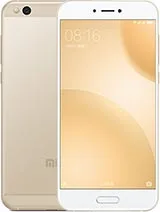
Find and download official MIUI firmware for Mi 5C China (meri). All firmware files include MD5 hash verification and are available for direct download.
| Version | Method | Size | Release Date | MD5 Hash | Download |
|---|---|---|---|---|---|
| V11.0.3.0.NCJCNXM | Recovery | 1.5 GB | 2019-12-10 |
98c238d06606c380bedfb266c008d36f
|
Download |
| V10.2.1.0.NCJCNXM | Recovery | 1.4 GB | 2019-02-13 |
b6059c30b2f9160540749a85f6fe1409
|
Download |
| V10.1.1.0.NCJCNFI | Recovery | 1.4 GB | 2018-11-12 |
63d0cda92050c3ba449cb3da710d4a0b
|
Download |
| V9.6.3.0.NCJCNFD | Recovery | 1.3 GB | 2018-08-21 |
87c77a67dcc75f82aa5fa120c3a41f5d
|
Download |
| V9.6.2.0.NCJCNFD | Recovery | 1.3 GB | 2018-07-11 |
64d76ae7eb1dd0cab537d502b1319a43
|
Download |
| V9.5.2.0.NCJCNFA | Fastboot | 2 GB | 2018-04-06 |
1ea52e3c0f7096aff2adea3f6a01bbd6
|
Download |
| V9.5.1.0.NCJCNFA | Fastboot | 2 GB | 2018-03-05 |
33f2b41bcbe49affc222634c29fd1176
|
Download |
| V9.2.1.0.NCJCNEK | Fastboot | 1.9 GB | 2018-01-18 |
9580c3fc1eee5872e630a9caeeee47f4
|
Download |
| V9.1.9.0.NCJCNEI | Fastboot | 1.9 GB | 2018-01-05 |
d63e0fe7fc56d39f3a917d2c67495980
|
Download |
| V9.1.5.0.NCJCNEI | Fastboot | 1.9 GB | 2017-11-29 |
a5e587c7c5e19033f2546b61a3cdce92
|
Download |
| V9.1.2.0.NCJCNEI | Fastboot | 1.9 GB | 2017-11-02 |
2b0bb19efbc19c936e3f60edbbd0711b
|
Download |
| V8.5.5.0.NCJCNED | Fastboot | 1.9 GB | 2017-09-22 |
8b2a0e9baba5cf23aa11742aa9ac1acb
|
Download |
| V8.5.4.0.NCJCNED | Fastboot | 1.7 GB | 2017-07-24 |
6f66f05d1dd33989e256f52863587bca
|
Download |
| V8.5.3.0.NCJCNED | Recovery | 1.2 GB | 2017-06-17 |
dd8416320b8977f0d6a44b7d7af960fe
|
Download |
| V8.1.19.0.MCJCNDI | Fastboot | 1.4 GB | 2017-05-19 |
3c85f79dc5575efc756ada0ef8008e0e
|
Download |
| V8.1.15.0.MCJCNDI | Fastboot | 1.4 GB | 2017-04-13 |
34c6cf801070a3a4eb38a94d4889bde0
|
Download |
| V8.1.14.0.MCJCNDI | Fastboot | 1.4 GB | 2017-03-27 |
6d91cd733461918fd22958020cd3b9e7
|
Download |
| V8.1.13.0.MCJCNDI | Fastboot | 1.4 GB | 2017-03-16 |
8d0a7f997a9bdc37703e1abde3d2b496
|
Download |
| V8.1.10.0.MCJCNDI | Fastboot | 1.5 GB | 2017-02-24 |
6c737b6a8be2b3b1b475f1844d582dc5
|
Download |
| V8.1.6.0.MCJCNDI | Recovery | 911.3 MB | 2017-02-08 |
8826059e371bdcbb91905dbc357fa9d7
|
Download |
| V8.1.4.0.MCJCNDI | Recovery | 911.2 MB | 2017-01-17 |
f8ff67214bd152a2c691a3436c226631
|
Download |
| V8.1.3.0.MCJCNDI | Recovery | 910.5 MB | 2017-01-04 |
42c62631ad84d7dbeecf21334f86bede
|
Download |
Xiaomi Mi 5c • Processor: Octa-core Xiaomi Surge S1 • RAM: 3 GB • Storage: 64 GB • Display: 5.15 inches • Camera: 12 MP + 8 MP • Battery: Android 7.1 (Nougat) ...
For China
| Network | Technology | GSM / LTE |
|---|---|---|
| 2G bands | GSM 900 / 1800 / 1900 - SIM 1 & SIM 2 | |
| 3G bands | TD-SCDMA | |
| 4G bands | 38, 39, 40, 41 | |
| Speed | HSPA, LTE | |
| GPRS | Yes | |
| EDGE | Yes |
| Launch | Announced | 2017, February. Released 2017, March |
|---|---|---|
| Status | Discontinued |
| Body | Dimensions | 144.4 x 69.7 x 7.1 mm (5.69 x 2.74 x 0.28 in) |
|---|---|---|
| Weight | 135 g (4.76 oz) | |
| Build | Glass front, aluminum back, aluminum frame | |
| SIM | Nano-SIM + Nano-SIM |
| Display | Type | IPS LCD |
|---|---|---|
| Size | 5.15 inches, 73.1 cm2 (~72.6% screen-to-body ratio) | |
| Resolution | 1080 x 1920 pixels, 16:9 ratio (~428 ppi density) |
| Platform | OS | Android 7.1 (Nougat), MIUI 8 |
|---|---|---|
| Chipset | Xiaomi Surge S1 | |
| CPU | Octa-core (4x2.2 GHz Cortex-A53 & 4x1.4 GHz Cortex-A53) | |
| GPU | Mali-T860MP4 |
| Memory | Card slot | No |
|---|---|---|
| Internal | 64GB 3GB RAM |
| Main Camera | Single | 12 MP, f/2.2, 27mm (wide), 1.25µm, PDAF |
|---|---|---|
| Features | Dual-LED dual-tone flash, HDR, panorama | |
| Video | 1080p@30fps |
| Selfie camera | Single | 8 MP, f/2.0, 27mm (wide) |
|---|---|---|
| Video | 1080p@30fps |
| Sound | Loudspeaker | Yes |
|---|---|---|
| 3.5mm jack | Yes |
| Comms | WLAN | Wi-Fi 802.11 a/b/g/n/ac, dual-band, Wi-Fi Direct |
|---|---|---|
| Bluetooth | 4.1, A2DP, LE | |
| Positioning | GPS, GLONASS, BDS | |
| NFC | No | |
| Infrared port | Yes | |
| Radio | FM radio | |
| USB | USB Type-C |
| Features | Sensors | Fingerprint (front-mounted), accelerometer, gyro, proximity, compass |
|---|
| Battery | Type | Li-Ion 2860 mAh, non-removable |
|---|---|---|
| Charging | 18W wired, QC3 |
| Misc | Colors | Black, Gold, Rose Gold |
|---|---|---|
| Price | About 150 EUR |
⚠️ Warning: Flashing custom ROMs may void your warranty. Proceed at your own risk.
A: Yes, flashing official firmware is generally safe and won't void your warranty if done through official methods.
A: Recovery ROMs are flashed from recovery mode, while Fastboot ROMs require bootloader unlock and ADB tools.
A: Some devices allow downgrading, but it depends on the device and region. Check device-specific forums first.
A: If flashing fails, try using the official tool, ensure USB drivers are installed, and check device compatibility.





