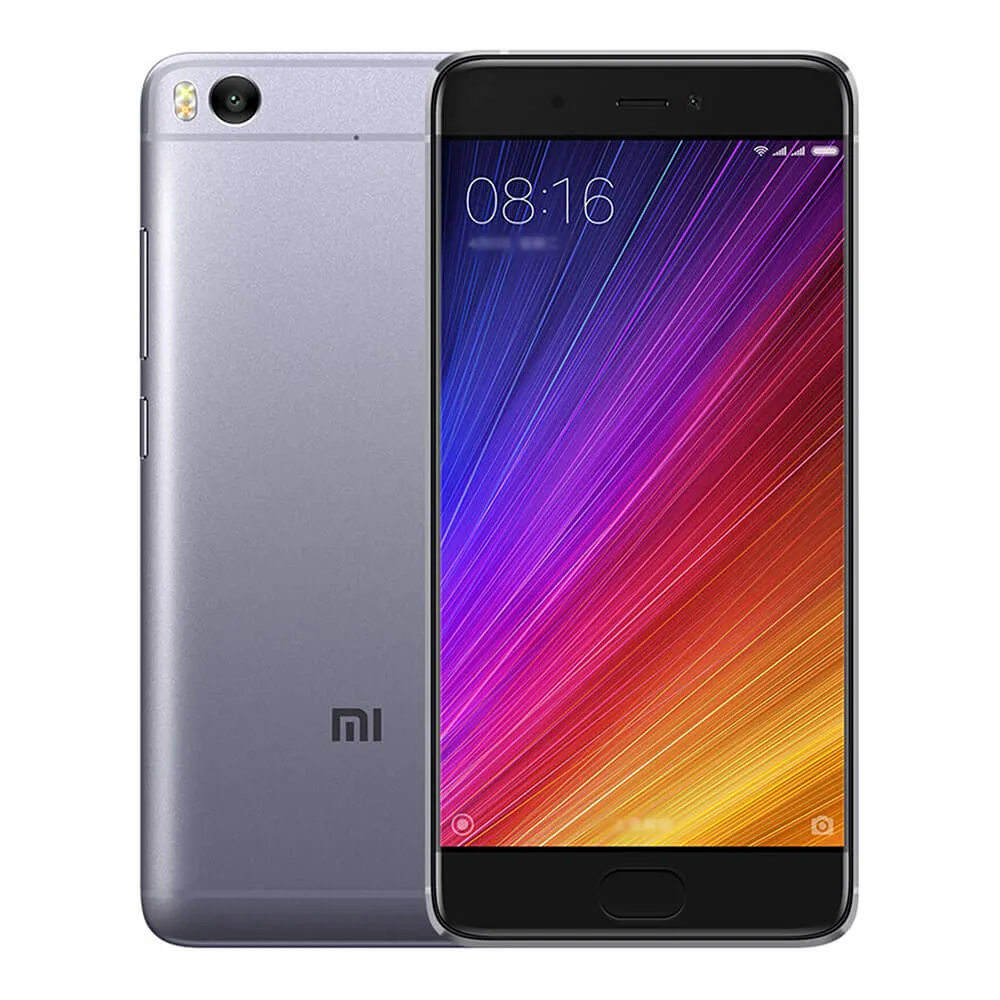
Find and download official MIUI firmware for Mi 5s China (capricorn). All firmware files include MD5 hash verification and are available for direct download.
| Version | Method | Size | Release Date | MD5 Hash | Download |
|---|---|---|---|---|---|
| V11.0.2.0.OAGCNXM | Fastboot | 2.1 GB | 2019-11-11 |
714988e4b731e51a101d70a104491cd4
|
Download |
| V10.2.2.0.OAGCNXM | Recovery | 1.6 GB | 2019-05-13 |
d332da1582a363438783adfefe6a6559
|
Download |
| V10.2.1.0.OAGCNXM | Recovery | 1.6 GB | 2019-01-22 |
8db69b24630da64aef7cb3b29a906e76
|
Download |
| V10.1.2.0.OAGCNFI | Recovery | 1.7 GB | 2018-12-13 |
e15ec6ca83a41ac8b168df29c9e067cd
|
Download |
| V10.1.1.0.NAGCNFI | Fastboot | 2.2 GB | 2018-11-12 |
6f89358adf76e00d06d0827fe0f6a7ed
|
Download |
| V9.6.1.0.NAGCNFD | Recovery | 1.6 GB | 2018-06-22 |
857fde8b418c4741b59ca730da818376
|
Download |
| V9.5.2.0.NAGCNFA | Fastboot | 2.2 GB | 2018-04-05 |
959cdc4d1b812781b6c1c99ec1f3b3c8
|
Download |
| V9.5.1.0.NAGCNFA | Fastboot | 2.2 GB | 2018-03-01 |
91611f69a8a49da25dfea84fe0f24a0b
|
Download |
| V9.2.2.0.NAGCNEK | Fastboot | 2.2 GB | 2018-01-25 |
c666f232f334b1aaed8733590f8daaec
|
Download |
| V9.2.1.0.NAGCNEK | Fastboot | 2.2 GB | 2017-12-28 |
a46ad18625941aff8dfe5f5ce2660c28
|
Download |
| V9.1.3.0.NAGCNEI | Fastboot | 2.2 GB | 2017-11-27 |
93900fbdafcd787298c4a85187f01684
|
Download |
| V9.1.2.0.NAGCNEI | Fastboot | 2.2 GB | 2017-11-01 |
515fee17a16f581135fb46b7132e50a2
|
Download |
| V8.5.6.0.MAGCNED | Fastboot | 2.1 GB | 2017-09-26 |
b31597430b2a02f577a7a54dc6e16726
|
Download |
| V8.5.4.0.MAGCNED | Fastboot | 2 GB | 2017-07-28 |
1ebbc613639753e727e18a800605cafe
|
Download |
| V8.5.3.0.MAGCNED | Fastboot | 2 GB | 2017-06-26 |
9260abaf056d97683c1208a553bd7774
|
Download |
| V8.5.2.0.MAGCNED | Fastboot | 2 GB | 2017-05-23 |
4d67a2821deb0d6be63f7d44076160e0
|
Download |
| V8.2.4.0.MAGCNDL | Fastboot | 1.9 GB | 2017-04-13 |
9b2b8b42e8c15c381c90a059f5328b43
|
Download |
| V8.2.3.0.MAGCNDL | Fastboot | 1.9 GB | 2017-03-14 |
af6fe518da5f65997e8e5173ad789142
|
Download |
| V8.2.2.0.MAGCNDL | Fastboot | 1.8 GB | 2017-02-10 |
8816ff5f89d2d121ea48bb064eec1d51
|
Download |
| V8.0.22.0.MAGCNDI | Fastboot | 1.8 GB | 2016-12-29 |
bef38e8768e5ef42af5e6e03521eda8f
|
Download |
| V8.0.18.0.MAGCNDI | Fastboot | 1.8 GB | 2016-11-22 |
67352be4ef39363f23cede1f2a48ca1f
|
Download |
| V8.0.17.0.MAGCNDI | Fastboot | 1.8 GB | 2016-11-11 |
53f945f6f39fbc04f358d2c8a04dd3dc
|
Download |
| V8.0.10.0.MAGCNDH | Recovery | 1.1 GB | 2016-09-26 |
da90aee78b508b31b7809296944c53e3
|
Download |
| Version | Method | Size | Release Date | MD5 Hash | Download |
|---|---|---|---|---|---|
| V11.0.2.0.OAGCNXM | Fastboot | 2.1 GB | 2019-11-11 |
714988e4b731e51a101d70a104491cd4
|
Download |
| V10.2.2.0.OAGCNXM | Recovery | 1.6 GB | 2019-05-13 |
d332da1582a363438783adfefe6a6559
|
Download |
| V10.2.1.0.OAGCNXM | Recovery | 1.6 GB | 2019-01-22 |
8db69b24630da64aef7cb3b29a906e76
|
Download |
| V10.1.2.0.OAGCNFI | Recovery | 1.7 GB | 2018-12-13 |
e15ec6ca83a41ac8b168df29c9e067cd
|
Download |
| V10.1.1.0.NAGCNFI | Fastboot | 2.2 GB | 2018-11-12 |
6f89358adf76e00d06d0827fe0f6a7ed
|
Download |
| V9.6.1.0.NAGCNFD | Recovery | 1.6 GB | 2018-06-22 |
857fde8b418c4741b59ca730da818376
|
Download |
| V9.5.2.0.NAGCNFA | Fastboot | 2.2 GB | 2018-04-05 |
959cdc4d1b812781b6c1c99ec1f3b3c8
|
Download |
| V9.5.1.0.NAGCNFA | Fastboot | 2.2 GB | 2018-03-01 |
91611f69a8a49da25dfea84fe0f24a0b
|
Download |
| V9.2.2.0.NAGCNEK | Fastboot | 2.2 GB | 2018-01-25 |
c666f232f334b1aaed8733590f8daaec
|
Download |
| V9.2.1.0.NAGCNEK | Fastboot | 2.2 GB | 2017-12-28 |
a46ad18625941aff8dfe5f5ce2660c28
|
Download |
| V9.1.3.0.NAGCNEI | Fastboot | 2.2 GB | 2017-11-27 |
93900fbdafcd787298c4a85187f01684
|
Download |
| V9.1.2.0.NAGCNEI | Fastboot | 2.2 GB | 2017-11-01 |
515fee17a16f581135fb46b7132e50a2
|
Download |
| V8.5.6.0.MAGCNED | Fastboot | 2.1 GB | 2017-09-26 |
b31597430b2a02f577a7a54dc6e16726
|
Download |
| V8.5.4.0.MAGCNED | Fastboot | 2 GB | 2017-07-28 |
1ebbc613639753e727e18a800605cafe
|
Download |
| V8.5.3.0.MAGCNED | Fastboot | 2 GB | 2017-06-26 |
9260abaf056d97683c1208a553bd7774
|
Download |
| V8.5.2.0.MAGCNED | Fastboot | 2 GB | 2017-05-23 |
4d67a2821deb0d6be63f7d44076160e0
|
Download |
| V8.2.4.0.MAGCNDL | Fastboot | 1.9 GB | 2017-04-13 |
9b2b8b42e8c15c381c90a059f5328b43
|
Download |
| V8.2.3.0.MAGCNDL | Fastboot | 1.9 GB | 2017-03-14 |
af6fe518da5f65997e8e5173ad789142
|
Download |
| V8.2.2.0.MAGCNDL | Fastboot | 1.8 GB | 2017-02-10 |
8816ff5f89d2d121ea48bb064eec1d51
|
Download |
| V8.0.22.0.MAGCNDI | Fastboot | 1.8 GB | 2016-12-29 |
bef38e8768e5ef42af5e6e03521eda8f
|
Download |
| V8.0.18.0.MAGCNDI | Fastboot | 1.8 GB | 2016-11-22 |
67352be4ef39363f23cede1f2a48ca1f
|
Download |
| V8.0.17.0.MAGCNDI | Fastboot | 1.8 GB | 2016-11-11 |
53f945f6f39fbc04f358d2c8a04dd3dc
|
Download |
| V8.0.10.0.MAGCNDH | Recovery | 1.1 GB | 2016-09-26 |
da90aee78b508b31b7809296944c53e3
|
Download |
Xiaomi Mi5s MIUI 8 5.15 inch 4G Smartphone Snapdragon 821 2.15GHz Quad Core 3GB RAM 64GB ROM FHD Screen Fingerprint Scanner Type-C
| Network | Technology | GSM / CDMA / HSPA / EVDO / LTE |
|---|---|---|
| 2G bands | GSM 850 / 900 / 1800 / 1900 - SIM 1 & SIM 2 | |
| CDMA 800 | ||
| 3G bands | HSDPA 850 / 900 / 1900 / 2100 | |
| CDMA2000 1xEV-DO | ||
| 4G bands | 1, 3, 5, 7, 8, 38, 39, 40, 41 | |
| Speed | HSPA 42.2/5.76 Mbps, LTE (4CA) Cat12 600/150 Mbps |
| Launch | Announced | 2016, September. Released 2016, October |
|---|---|---|
| Status | Discontinued |
| Body | Dimensions | 145.6 x 70.3 x 8.3 mm (5.73 x 2.77 x 0.33 in) |
|---|---|---|
| Weight | 145 g (5.11 oz) | |
| Build | Glass front, aluminum back, aluminum frame | |
| SIM | Nano-SIM + Nano-SIM |
| Display | Type | IPS LCD |
|---|---|---|
| Size | 5.15 inches, 73.1 cm2 (~71.4% screen-to-body ratio) | |
| Resolution | 1080 x 1920 pixels, 16:9 ratio (~428 ppi density) | |
| Protection | To be confirmed | |
| 3D Touch display (128 GB, 4 GB RAM model) |
| Platform | OS | Android 6.0 (Marshmallow), upgradable to 7.0 (Nougat), MIUI 10 |
|---|---|---|
| Chipset | Qualcomm MSM8996 Snapdragon 821 (14 nm) | |
| CPU | Quad-core (2x2.15 GHz Kryo & 2x1.6 GHz Kryo) | |
| GPU | Adreno 530 |
| Memory | Card slot | No |
|---|---|---|
| Internal | 64GB 3GB RAM, 128GB 4GB RAM |
| Main Camera | Single | 12 MP, f/2.0, 1/2.3", 1.55µm, PDAF |
|---|---|---|
| Features | Dual-LED dual-tone flash, panorama | |
| Video | 4K@30fps, 1080p@120fps |
| Selfie camera | Single | 4 MP, f/2.0, 1/3", 2µm |
|---|---|---|
| Video | 1080p@30fps |
| Sound | Loudspeaker | Yes |
|---|---|---|
| 3.5mm jack | Yes |
| Comms | WLAN | Wi-Fi 802.11 a/b/g/n/ac, dual-band, Wi-Fi Direct, DLNA |
|---|---|---|
| Bluetooth | 4.2, A2DP, LE | |
| Positioning | GPS, GLONASS, BDS | |
| NFC | Yes | |
| Radio | No | |
| USB | USB Type-C |
| Features | Sensors | Fingerprint (front-mounted), accelerometer, gyro, proximity, compass, barometer |
|---|
| Battery | Type | Li-Ion 3200 mAh, non-removable |
|---|---|---|
| Charging | 18W wired, QC3 |
| Misc | Colors | Silver, Gray, Gold, Rose Gold |
|---|---|---|
| Models | 2015711 | |
| SAR | 0.77 W/kg (head) 1.01 W/kg (body) | |
| Price | About 250 EUR |
| Our Tests | Performance | Basemark OS II 2.0: 2378Basemark X: 36240 |
|---|---|---|
| Display | Contrast ratio: 1294:1 (nominal), 3.276 (sunlight) | |
| Camera | Photo / Video | |
| Loudspeaker | Voice 64dB / Noise 70dB / Ring 84dB | |
| Audio quality | Noise -89.6dB / Crosstalk -85.5dB | |
| Battery (old) | Endurance rating 84h | |
⚠️ Warning: Flashing custom ROMs may void your warranty. Proceed at your own risk.
A: Yes, flashing official firmware is generally safe and won't void your warranty if done through official methods.
A: Recovery ROMs are flashed from recovery mode, while Fastboot ROMs require bootloader unlock and ADB tools.
A: Some devices allow downgrading, but it depends on the device and region. Check device-specific forums first.
A: If flashing fails, try using the official tool, ensure USB drivers are installed, and check device compatibility.





