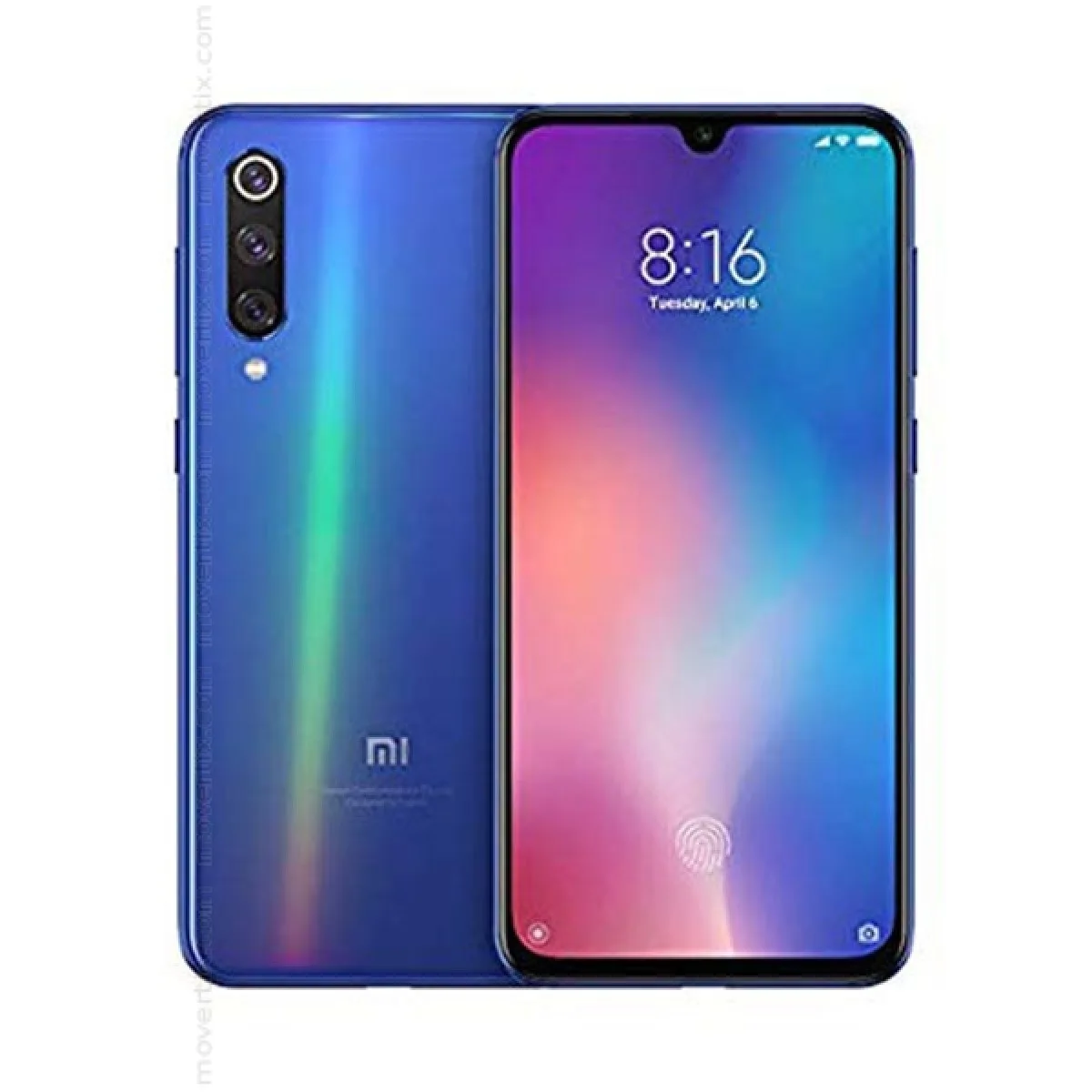
Find and download official MIUI firmware for Mi 9 SE China (grus). All firmware files include MD5 hash verification and are available for direct download.
| Version | Method | Size | Release Date | MD5 Hash | Download |
|---|---|---|---|---|---|
| V12.5.4.0.RFBCNXM | Fastboot | 4 GB | 2021-11-17 |
adca3b2679528625ca9535825cebe4bd
|
Download |
| V12.5.1.0.RFBCNXM | Fastboot | 2.45 GB | 2021-03-30 |
0aa6dd99a157fc8320557fada77b1651
|
Download |
| V12.0.3.0.QFBCNXM | Fastboot | 2.5 GB | 2020-11-30 |
262c62843265bacbd5aa9ceb8993721a
|
Download |
| V12.0.2.0.QFBCNXM | Fastboot | 2.53 GB | 2020-08-13 |
7bd57917433dcc1c51f7cd0a9159f123
|
Download |
| V12.0.1.0.QFBCNXM | Fastboot | 2.53 GB | 2020-07-22 |
4e2bbe6ba905eab2e004584367b78caa
|
Download |
| V11.0.5.0.PFBCNXM | Recovery | 2.5 GB | 2019-11-05 |
41b4612800f302d7e781086d9969ef2e
|
Download |
| V11.0.3.0.QFBCNXM | Fastboot | 3.27 GB | 2020-04-26 |
5f915130e66ae5e380d6882d2f8e56a0
|
Download |
| V11.0.3.0.PFBCNXM | Recovery | 2.5 GB | 2019-10-10 |
798b0ceef17352fefd4025399f8eb972
|
Download |
| V11.0.2.0.QFBCNXM | Recovery | 2.6 GB | 2020-02-24 |
40ad667ea36596458bb4945348a5687d
|
Download |
| V11.0.1.0.QFBCNXM | Recovery | 2.6 GB | 2020-01-02 |
c79c87d07d3887b7db8246d70e24bc50
|
Download |
| V10.3.6.0.PFBCNXM | Recovery | 2.4 GB | 2019-08-29 |
71316d435ae979ab5b0fb4394bfd7570
|
Download |
| V10.3.3.0.PFBCNXM | Recovery | 2.2 GB | 2019-06-18 |
3dcc2884fc211c0fdcb78eb30a6c74c0
|
Download |
| V10.3.1.0.PFBCNXM | Recovery | 2.2 GB | 2019-05-09 |
60d33fe1c3f83d9162b0d00d485242a7
|
Download |
| V10.2.11.0.PFBCNXM | Recovery | 2.2 GB | 2019-04-23 |
a2557d7524e6c029768fe65f8c3256c7
|
Download |
| V10.2.8.0.PFBCNXM | Recovery | 2.2 GB | 2019-03-28 |
7ae933bff91b616a152fbb8d6dfb86b7
|
Download |
| V10.2.5.0.PFBCNXM | Recovery | 2.2 GB | 2019-03-12 |
a8508c5e9edc31f14c81419c60d9bf97
|
Download |
| V10.2.3.0.PFBCNXM | Fastboot | 3.2 GB | 2019-03-01 |
93c45bcae8a4209880f816df4b778140
|
Download |
| Version | Method | Size | Release Date | MD5 Hash | Download |
|---|---|---|---|---|---|
| V12.5.1.0.RFBEUXM | Recovery | 2.6 GB | 2021-06-04 |
0c905c26edf7722bbe5cdaa2793b8311
|
Download |
| V12.0.5.0.QFBEUXM | Recovery | 2.5 GB | 2021-04-15 |
6aea8866c8c5802a38ecf9f80d93252b
|
Download |
| V12.0.4.0.QFBEUXM | Recovery | 2.5 GB | 2021-03-15 |
fe7f3824664adf9075eac3b7e915a00b
|
Download |
| V12.0.3.0.QFBEUXM | Recovery | 2.5 GB | 2020-12-15 |
81b6632b04b173eeaa46f055f291419e
|
Download |
| V12.0.2.0.QFBEUXM | Recovery | 2.5 GB | 2020-10-26 |
e0d020988df1dca4fd888df21c68fd10
|
Download |
| V12.0.1.0.QFBEUXM | Recovery | 2.5 GB | 2020-08-17 |
3fa88110054e2f847ad33c0622324c20
|
Download |
| V11.0.13.0.PFBEUXM | Recovery | 2.3 GB | 2020-02-10 |
b22d201839bde6acbd9ecc35d0141020
|
Download |
| V11.0.9.0.QFBEUXM | Recovery | 2.4 GB | 2020-08-11 |
27f2ff2de9c33c1f7e8366a30b389a9b
|
Download |
| V11.0.6.0.QFBEUXM | Recovery | 2.4 GB | 2020-06-18 |
508141efd02158b54a40a578e906064a
|
Download |
| V11.0.6.0.PFBEUXM | Recovery | 2.3 GB | 2020-01-03 |
6e5dea41d3db695f4b04d1005ca5b927
|
Download |
| V11.0.5.0.QFBEUXM | Recovery | 2.4 GB | 2020-05-06 |
fc63e85941637529f53c7e9d0b97a7e1
|
Download |
| V11.0.4.0.PFBEUXM | Recovery | 2.3 GB | 2019-11-04 |
d4f398c886986f7fe058f62a15aba068
|
Download |
| V11.0.2.0.QFBEUXM | Recovery | 2.4 GB | 2020-03-19 |
522065df4b9810224229a9c9c27850e5
|
Download |
| V10.3.11.0.PFBEUXM | Recovery | 2.3 GB | 2019-11-21 |
de295e7f9f127b226434c41384016a47
|
Download |
| V10.3.9.0.PFBEUXM | Recovery | 2.3 GB | 2019-09-25 |
f1b6a0764f8d84d59d1583a3f1776138
|
Download |
| V10.3.8.0.PFBEUXM | Recovery | 2.3 GB | 2019-09-27 |
9bad56999df299364a479808fef39688
|
Download |
| V10.3.4.0.PFBEUXM | Recovery | 2.3 GB | 2019-08-06 |
409f6dbb6ff4e10d0ee4f54610a566df
|
Download |
| V10.3.1.0.PFBEUXM | Recovery | 2.1 GB | 2019-06-21 |
3d43a95581e30d2ebf3f3338037b2064
|
Download |
| V10.2.9.0.PFBEUXM | Fastboot | 3 GB | 2019-06-18 |
aa49baa4ddc673a1f246d5c94ae26064
|
Download |
| V10.2.5.0.PFBEUXM | Recovery | 2 GB | 2019-04-29 |
16141f0824650e57b7ca4910aa326df3
|
Download |
| V10.2.3.0.PFBEUXM | Recovery | 2 GB | 2019-04-28 |
e9501746e2857403fac77ab4dbeac3e0
|
Download |
| Version | Method | Size | Release Date | MD5 Hash | Download |
|---|---|---|---|---|---|
| V12.5.1.0.RFBMIXM | Recovery | 2.6 GB | 2021-05-25 |
c04478d7035051c90e8a8484cfd83e55
|
Download |
| V12.0.4.0.QFBMIXM | Recovery | 2.5 GB | 2021-03-19 |
429a2a78a5118673eb39f6d9a849deca
|
Download |
| V12.0.3.0.QFBMIXM | Recovery | 2.5 GB | 2020-12-21 |
6296b46b35fa035b4a2ae98164893891
|
Download |
| V12.0.2.0.QFBMIXM | Recovery | 2.5 GB | 2020-10-13 |
c855a1dd7e494f7f91c8e60bf3231aa0
|
Download |
| V12.0.1.0.QFBMIXM | Recovery | 2.5 GB | 2020-08-17 |
d7ee8341ff7810696a4c245fefa90640
|
Download |
| V11.0.6.0.PFBMIXM | Recovery | 2.3 GB | 2020-01-02 |
df3fdf69d6086f147e59d9239c66b7f8
|
Download |
| V11.0.4.0.QFBMIXM | Recovery | 2.4 GB | 2020-06-28 |
fae587a098b3b8e62f4c466982e0c9c9
|
Download |
| V11.0.4.0.PFBMIXM | Recovery | 2.3 GB | 2019-11-01 |
af38858a0f48f38a5e805ac979237d42
|
Download |
| V11.0.3.0.QFBMIXM | Recovery | 2.4 GB | 2020-05-06 |
630056affc9bf4af7568e0aa2a9c5c6d
|
Download |
| V11.0.2.0.QFBMIXM | Recovery | 2.4 GB | 2020-03-19 |
5e899dbcecf7f0ec3ee4090345438e74
|
Download |
| V10.3.4.0.PFBMIXM | Recovery | 2.3 GB | 2019-09-25 |
1af3c0ea1eeca609d466d214442b8deb
|
Download |
| V10.3.3.0.PFBMIXM | Recovery | 2.3 GB | 2019-08-05 |
2842fe0d8fdd166cc62b771717709f80
|
Download |
| V10.3.1.0.PFBMIXM | Fastboot | 3.1 GB | 2019-06-21 |
cd2042f4b38c7b78d83d1e7ce785c739
|
Download |
| V10.2.2.0.PFBMIXM | Recovery | 2 GB | 2019-06-11 |
b4cc336f0d18e61eb291ae3fb2dd6105
|
Download |
| Version | Method | Size | Release Date | MD5 Hash | Download |
|---|---|---|---|---|---|
| V12.5.1.0.RFBMIXM | Recovery | 2.6 GB | 2021-05-25 |
c04478d7035051c90e8a8484cfd83e55
|
Download |
| V12.0.4.0.QFBMIXM | Recovery | 2.5 GB | 2021-03-19 |
429a2a78a5118673eb39f6d9a849deca
|
Download |
| V12.0.3.0.QFBMIXM | Recovery | 2.5 GB | 2020-12-21 |
6296b46b35fa035b4a2ae98164893891
|
Download |
| V12.0.2.0.QFBMIXM | Recovery | 2.5 GB | 2020-10-13 |
c855a1dd7e494f7f91c8e60bf3231aa0
|
Download |
| V12.0.1.0.QFBMIXM | Recovery | 2.5 GB | 2020-08-17 |
d7ee8341ff7810696a4c245fefa90640
|
Download |
| V11.0.6.0.PFBMIXM | Recovery | 2.3 GB | 2020-01-02 |
df3fdf69d6086f147e59d9239c66b7f8
|
Download |
| V11.0.4.0.QFBMIXM | Recovery | 2.4 GB | 2020-06-28 |
fae587a098b3b8e62f4c466982e0c9c9
|
Download |
| V11.0.4.0.PFBMIXM | Recovery | 2.3 GB | 2019-11-01 |
af38858a0f48f38a5e805ac979237d42
|
Download |
| V11.0.3.0.QFBMIXM | Recovery | 2.4 GB | 2020-05-06 |
630056affc9bf4af7568e0aa2a9c5c6d
|
Download |
| V11.0.2.0.QFBMIXM | Recovery | 2.4 GB | 2020-03-19 |
5e899dbcecf7f0ec3ee4090345438e74
|
Download |
| V10.3.4.0.PFBMIXM | Recovery | 2.3 GB | 2019-09-25 |
1af3c0ea1eeca609d466d214442b8deb
|
Download |
| V10.3.3.0.PFBMIXM | Recovery | 2.3 GB | 2019-08-05 |
2842fe0d8fdd166cc62b771717709f80
|
Download |
| V10.3.1.0.PFBMIXM | Fastboot | 3.1 GB | 2019-06-21 |
cd2042f4b38c7b78d83d1e7ce785c739
|
Download |
| V10.2.2.0.PFBMIXM | Recovery | 2 GB | 2019-06-11 |
b4cc336f0d18e61eb291ae3fb2dd6105
|
Download |
Xiaomi Mi 9 SE smartphone was launched in February 2019. The phone comes with a 5.97-inch touchscreen display with a resolution of 1080x2340 pixels at a ...
| Network | Technology | GSM / CDMA / HSPA / LTE |
|---|---|---|
| 2G bands | GSM 850 / 900 / 1800 / 1900 | |
| CDMA 800 & TD-SCDMA | ||
| 3G bands | HSDPA 850 / 900 / 1900 / 2100 | |
| 4G bands | 1, 3, 4, 5, 7, 8, 20, 38, 40 - Global | |
| 1, 3, 5, 7, 8, 34, 38, 39, 40, 41 - China | ||
| Speed | HSPA, LTE |
| Launch | Announced | 2019, February 20. Released 2019, March |
|---|---|---|
| Status | Discontinued |
| Body | Dimensions | 147.5 x 70.5 x 7.5 mm (5.81 x 2.78 x 0.30 in) |
|---|---|---|
| Weight | 155 g (5.47 oz) | |
| Build | Glass front (Gorilla Glass 5), glass back, aluminum frame | |
| SIM | Nano-SIM + Nano-SIM |
| Display | Type | Super AMOLED, HDR |
|---|---|---|
| Size | 5.97 inches, 87.5 cm2 (~84.1% screen-to-body ratio) | |
| Resolution | 1080 x 2340 pixels, 19.5:9 ratio (~432 ppi density) | |
| Protection | Corning Gorilla Glass 5 |
| Platform | OS | Android 9.0 (Pie), upgradable to Android 11, MIUI 12.5 |
|---|---|---|
| Chipset | Qualcomm SDM712 Snapdragon 712 (10 nm) | |
| CPU | Octa-core (2x2.3 GHz Kryo 360 Gold & 6x1.7 GHz Kryo 360 Silver) | |
| GPU | Adreno 616 |
| Memory | Card slot | No |
|---|---|---|
| Internal | 64GB 6GB RAM, 128GB 6GB RAM | |
| UFS 2.0 |
| Main Camera | Triple | 48 MP, f/1.8, (wide), 1/2.0", 0.8µm, PDAF 8 MP, f/2.4, (telephoto), 1/4.0", 1.12µm, PDAF 13 MP, f/2.4, (ultrawide), 1/3.1", 1.12µm |
|---|---|---|
| Features | Dual-LED flash, HDR, panorama | |
| Video | 4K@30fps, 1080p@30/60/120fps, 720p@960fps, gyro-EIS |
| Selfie camera | Single | 20 MP, f/2.0, (wide), 1/3", 0.9µm |
|---|---|---|
| Features | HDR | |
| Video | 1080p@30fps |
| Sound | Loudspeaker | Yes |
|---|---|---|
| 3.5mm jack | No |
| Comms | WLAN | Wi-Fi 802.11 a/b/g/n/ac, dual-band, Wi-Fi Direct, DLNA |
|---|---|---|
| Bluetooth | 5.0, A2DP, LE, aptX HD | |
| Positioning | GPS, GLONASS, GALILEO, BDS | |
| NFC | Yes | |
| Infrared port | Yes | |
| Radio | No | |
| USB | USB Type-C 2.0, OTG |
| Features | Sensors | Fingerprint (under display, optical), accelerometer, gyro, compass |
|---|---|---|
| Virtual proximity sensing |
| Battery | Type | Li-Po 3070 mAh, non-removable |
|---|---|---|
| Charging | 18W wired |
| Misc | Colors | Violet, Blue, Gray |
|---|---|---|
| Models | M1903F2G | |
| SAR | 1.39 W/kg (head) 1.39 W/kg (body) | |
| SAR EU | 1.19 W/kg (head) 1.17 W/kg (body) | |
| Price | About 460 EUR |
| Our Tests | Performance | AnTuTu: 180057 (v7) GeekBench: 6017 (v4.4) GFXBench: 14fps (ES 3.1 onscreen) |
|---|---|---|
| Display | 637 nits max brightness (measured) | |
| Camera | Photo / Video | |
| Loudspeaker | Voice 86dB / Noise 79dB / Ring 87dB | |
| Audio quality | Noise -93.5dB / Crosstalk -93.5dB | |
| Battery (old) | Endurance rating 73h | |
⚠️ Warning: Flashing custom ROMs may void your warranty. Proceed at your own risk.
A: Yes, flashing official firmware is generally safe and won't void your warranty if done through official methods.
A: Recovery ROMs are flashed from recovery mode, while Fastboot ROMs require bootloader unlock and ADB tools.
A: Some devices allow downgrading, but it depends on the device and region. Check device-specific forums first.
A: If flashing fails, try using the official tool, ensure USB drivers are installed, and check device compatibility.





