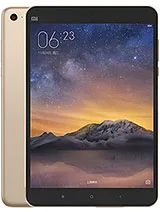
Find and download official MIUI firmware for MiPad 2 China (latte). All firmware files include MD5 hash verification and are available for direct download.
| Version | Method | Size | Release Date | MD5 Hash | Download |
|---|---|---|---|---|---|
| V9.6.2.0.LACCNFD | Recovery | 902.5 MB | 2018-09-07 |
a0dd7469a18adc9da76535f2f4c89337
|
Download |
| V9.6.1.0.LACCNFD | Recovery | 815.93 MB | 2018-05-22 |
819a4ad6636f6ff7a424037c3112e905
|
Download |
| V9.5.2.0.LACCNFA | Fastboot | 992.01 MB | 2018-04-05 |
0c4cd792f2a502d4068df162bb59d517
|
Download |
| V9.5.1.0.LACCNFA | Fastboot | 991.75 MB | 2018-02-27 |
23ab596f2a893935a4e40d0c9e03c640
|
Download |
| V9.2.4.0.LACCNEK | Fastboot | 995.77 MB | 2018-01-22 |
8ca89c8c846d7ccdcb739a47aa17e2e0
|
Download |
| V9.2.3.0.LACCNEK | Fastboot | 995.56 MB | 2017-12-13 |
72a38b638064f64758c5eecc60563e74
|
Download |
| V8.5.1.0.LACCNED | Recovery | 861.54 MB | 2017-05-31 |
d866c72f019e9fcbe47118e3a1fa463f
|
Download |
| V8.2.2.0.LACCNDL | Recovery | 834.34 MB | 2017-03-22 |
4be441fd89f3beda7e73714ab36632dc
|
Download |
| V8.2.1.0.LACCNDL | Recovery | 834.33 MB | 2017-01-16 |
80cce772b0944aa38d42776137fe4059
|
Download |
| V8.1.3.0.LACCNDI | Recovery | 833.38 MB | 2016-12-13 |
cd377c756987ce976fad32729cbb1b74
|
Download |
| V8.1.2.0.LACCNDI | Fastboot | 927.24 MB | 2016-11-20 |
c0533572ec93eb5a1dc009ebf3e24bee
|
Download |
| V8.1.1.0.LACCNDI | Fastboot | 927.24 MB | 2016-10-31 |
6a9bf7327aa3f412362adfdca960d13e
|
Download |
| V7.5.4.0.LACCNDE | Recovery | 767.82 MB | 2018-08-03 |
5e2baf03fe9cd28a679b9a2e1860fc8a
|
Download |
| V7.5.2.0.LACCNDE | Recovery | 768.01 MB | 2018-08-03 |
89dc7d6bbcd8647c267103dabb1face0
|
Download |
| V7.2.1.0.LACCNDA | Recovery | 713.42 MB | 2016-02-26 |
d39eb1046d9f22044416a018db5ef8a7
|
Download |
| V7.1.9.0.LACCNCL | Recovery | 715.01 MB | 2016-02-22 |
f9e468d9c8d39d6dc306d4c46545c481
|
Download |
| V7.1.7.0.LACCNCL | Recovery | 711.27 MB | 2016-01-25 |
4fbe15ff92a59cdff6e0093c742ed39b
|
Download |
| V7.1.6.0.LACCNCL | Recovery | 711.27 MB | 2016-01-18 |
e6c026db83da84800017cc90ed794403
|
Download |
| V7.1.5.0.LACCNCL | Recovery | 711.26 MB | 2015-12-24 |
d230b4ded589643de3e6ed539e6d593a
|
Download |
| V7.1.3.0.LACCNCK | Recovery | 714.29 MB | 2015-12-18 |
56afcba1fe0f668b8efe5ab038796a30
|
Download |
| V7.1.2.0.LACCNCK | Recovery | 714.21 MB | 2015-12-10 |
e5111230aa75229e356511974f63c9ca
|
Download |
| V7.1.1.0.LXLCNCK | Recovery | 715.13 MB | 2015-12-04 |
d2f8ee38d1183443ce19c16181e80ecc
|
Download |
| V7.0.12.0.LXLCNCJ | Recovery | 699.72 MB | 2015-12-02 |
2b4c20e1c1b600cef21161973d1f5102
|
Download |
| V7.0.10.0.LXLCNCJ | Recovery | 697.5 MB | 2015-11-24 |
4cdd36da16fb2ab8abf7049aaa050982
|
Download |
| V7.0.8.0.LXLCNCJ | Recovery | 695.46 MB | 2015-11-04 |
4555b3c7bf7d0b490df71777a3667854
|
Download |
Xiaomi Mi Pad 2 Android tablet. Announced Nov 2015. Features 7.9″ IPS LCD display, Intel Atom X5-Z8500 chipset, 8 MP primary camera, 5 MP front camera, ...
| Network | Technology | No cellular connectivity |
|---|---|---|
| 2G bands | N/A | |
| GPRS | No | |
| EDGE | No |
| Launch | Announced | 2015, November. Released 2015, November |
|---|---|---|
| Status | Discontinued |
| Body | Dimensions | 200.4 x 132.6 x 7 mm (7.89 x 5.22 x 0.28 in) |
|---|---|---|
| Weight | 322 g (11.36 oz) | |
| SIM | No |
| Display | Type | IPS LCD |
|---|---|---|
| Size | 7.9 inches, 190.9 cm2 (~71.8% screen-to-body ratio) | |
| Resolution | 1536 x 2048 pixels, 4:3 ratio (~326 ppi density) |
| Platform | OS | Android OS/ Optional Windows 10 (64 GB model), MIUI 7 |
|---|---|---|
| Chipset | Intel Atom X5-Z8500 | |
| CPU | Quad-core 2.24 GHz | |
| GPU | Intel HD Graphics |
| Memory | Card slot | No |
|---|---|---|
| Internal | 16GB 2GB RAM, 64GB 2GB RAM |
| Main Camera | Single | 8 MP, f/2.0 |
|---|---|---|
| Video | 1080p@30fps |
| Selfie camera | Single | 5 MP |
|---|---|---|
| Video |
| Sound | Loudspeaker | Yes, with stereo speakers |
|---|---|---|
| 3.5mm jack | Yes |
| Comms | WLAN | Wi-Fi 802.11 a/b/g/n/ac, dual-band, Wi-Fi Direct, hotspot |
|---|---|---|
| Bluetooth | 4.1, A2DP, LE | |
| Positioning | No | |
| NFC | No | |
| Radio | No | |
| USB | USB Type-C |
| Features | Sensors | Accelerometer, gyro, compass |
|---|
| Battery | Type | Li-Po 6190 mAh, non-removable |
|---|---|---|
| Charging | 10W wired | |
| Stand-by | Up to 649 h | |
| Talk time | Up to 12 h 30 min (multimedia) | |
| Music play | Up to 100 h |
| Misc | Colors | Dark grey, Champagne gold |
|---|---|---|
| Price | About 180 EUR |
⚠️ Warning: Flashing custom ROMs may void your warranty. Proceed at your own risk.
A: Yes, flashing official firmware is generally safe and won't void your warranty if done through official methods.
A: Recovery ROMs are flashed from recovery mode, while Fastboot ROMs require bootloader unlock and ADB tools.
A: Some devices allow downgrading, but it depends on the device and region. Check device-specific forums first.
A: If flashing fails, try using the official tool, ensure USB drivers are installed, and check device compatibility.





