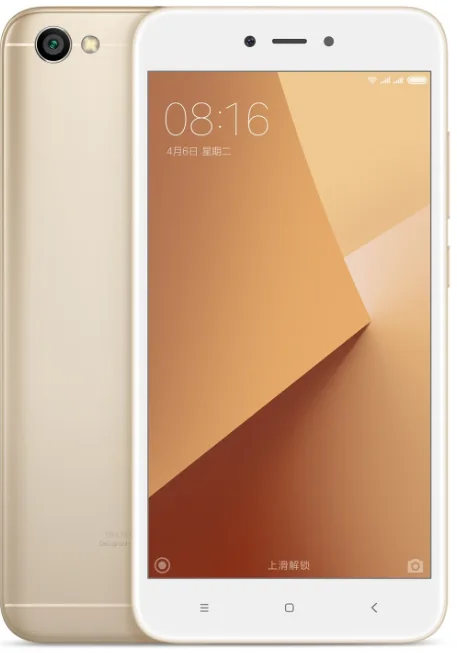
Find and download official MIUI firmware for Redmi Note 5A (2GB) China (ugglite). All firmware files include MD5 hash verification and are available for direct download.
| Version | Method | Size | Release Date | MD5 Hash | Download |
|---|---|---|---|---|---|
| V11.0.2.0.NDFCNXM | Recovery | 1.7 GB | 2019-11-05 |
531a889895eb11d5431d9eea93e8ef01
|
Download |
| V10.3.2.0.NDFCNXM | Recovery | 1.6 GB | 2019-07-31 |
1db4fef31bbae776bdf254ba2a5ffac2
|
Download |
| V10.2.1.0.NDFCNXM | Recovery | 1.6 GB | 2019-02-12 |
c9a6599274ec756c69ece021d12fbdcf
|
Download |
| V10.1.1.0.NDFCNFI | Recovery | 1.6 GB | 2018-10-16 |
96522095fe5023162a8b3dbc4acc0097
|
Download |
| V9.6.3.0.NDFCNFD | Recovery | 1.6 GB | 2018-08-15 |
b770072066e24ea923fdcd7bbb71af04
|
Download |
| V9.6.1.0.NDFCNFD | Recovery | 1.6 GB | 2018-06-29 |
6f0c623a985923e8199957277ec94aaa
|
Download |
| V9.5.6.0.NDFCNFA | Fastboot | 2.1 GB | 2018-05-11 |
abac48b4930a76c288e7260e253c68a0
|
Download |
| V9.5.5.0.NDFCNFA | Recovery | 1.4 GB | 2018-04-11 |
562747a2f2fdedc4e3a03d988071e3c1
|
Download |
| V9.5.2.0.NDFCNFA | Fastboot | 2.1 GB | 2018-03-23 |
b5742499e8f6efc0cc3931957a80ffb5
|
Download |
| V9.5.1.0.NDFCNFA | Recovery | 1.4 GB | 2018-02-26 |
69ea961abee60eafabb710867866bfdb
|
Download |
| V9.2.1.0.NDFCNEK | Recovery | 1.4 GB | 2017-12-29 |
7152b653a7ab14ed8edf02a479111090
|
Download |
| V9.1.6.0.NDFCNEI | Recovery | 1.4 GB | 2017-11-27 |
94792553361340270983a7f0f95f792e
|
Download |
| V9.1.4.0.NDFCNEI | Recovery | 1.4 GB | 2017-11-03 |
27f7f4b3eb5f644c4356300b907b61f3
|
Download |
| V8.5.10.0.NDFCNED | Recovery | 1.4 GB | 2017-10-12 |
32e5f323ac4e70ac52259d09d07c05fb
|
Download |
| V8.5.9.0.NDFCNED | Recovery | 1.4 GB | 2017-09-07 |
9b893594417d31cc63556da153d12e39
|
Download |
| V8.5.6.0.NDFCNED | Recovery | 1.4 GB | 2017-08-11 |
719fcb3e54bdd5e2cf9404a36963d42e
|
Download |
| Version | Method | Size | Release Date | MD5 Hash | Download |
|---|---|---|---|---|---|
| V11.0.2.0.NDFCNXM | Recovery | 1.7 GB | 2019-11-05 |
531a889895eb11d5431d9eea93e8ef01
|
Download |
| V10.3.2.0.NDFCNXM | Recovery | 1.6 GB | 2019-07-31 |
1db4fef31bbae776bdf254ba2a5ffac2
|
Download |
| V10.2.1.0.NDFCNXM | Recovery | 1.6 GB | 2019-02-12 |
c9a6599274ec756c69ece021d12fbdcf
|
Download |
| V10.1.1.0.NDFCNFI | Recovery | 1.6 GB | 2018-10-16 |
96522095fe5023162a8b3dbc4acc0097
|
Download |
| V9.6.3.0.NDFCNFD | Recovery | 1.6 GB | 2018-08-15 |
b770072066e24ea923fdcd7bbb71af04
|
Download |
| V9.6.1.0.NDFCNFD | Recovery | 1.6 GB | 2018-06-29 |
6f0c623a985923e8199957277ec94aaa
|
Download |
| V9.5.6.0.NDFCNFA | Fastboot | 2.1 GB | 2018-05-11 |
abac48b4930a76c288e7260e253c68a0
|
Download |
| V9.5.5.0.NDFCNFA | Recovery | 1.4 GB | 2018-04-11 |
562747a2f2fdedc4e3a03d988071e3c1
|
Download |
| V9.5.2.0.NDFCNFA | Fastboot | 2.1 GB | 2018-03-23 |
b5742499e8f6efc0cc3931957a80ffb5
|
Download |
| V9.5.1.0.NDFCNFA | Recovery | 1.4 GB | 2018-02-26 |
69ea961abee60eafabb710867866bfdb
|
Download |
| V9.2.1.0.NDFCNEK | Recovery | 1.4 GB | 2017-12-29 |
7152b653a7ab14ed8edf02a479111090
|
Download |
| V9.1.6.0.NDFCNEI | Recovery | 1.4 GB | 2017-11-27 |
94792553361340270983a7f0f95f792e
|
Download |
| V9.1.4.0.NDFCNEI | Recovery | 1.4 GB | 2017-11-03 |
27f7f4b3eb5f644c4356300b907b61f3
|
Download |
| V8.5.10.0.NDFCNED | Recovery | 1.4 GB | 2017-10-12 |
32e5f323ac4e70ac52259d09d07c05fb
|
Download |
| V8.5.9.0.NDFCNED | Recovery | 1.4 GB | 2017-09-07 |
9b893594417d31cc63556da153d12e39
|
Download |
| V8.5.6.0.NDFCNED | Recovery | 1.4 GB | 2017-08-11 |
719fcb3e54bdd5e2cf9404a36963d42e
|
Download |
Full specifications phone: Xiaomi Redmi Note 5A Prime (32GB) specs, detailed technical information, features, price and review. All about this ..
| Network | Technology | GSM / HSPA / LTE |
|---|---|---|
| 2G bands | GSM 850 / 900 / 1800 / 1900 - SIM 1 & SIM 2 | |
| 3G bands | HSDPA 850 / 900 / 1900 / 2100 | |
| 4G bands | 1, 3, 4, 5, 7, 8, 20, 38, 40 | |
| Speed | HSPA 42.2/5.76 Mbps, LTE |
| Launch | Announced | 2017, November |
|---|---|---|
| Status | Available. Released 2017, November |
| Body | Dimensions | 153 x 76.2 x 7.7 mm (6.02 x 3.00 x 0.30 in) |
|---|---|---|
| Weight | 153 g (5.40 oz) | |
| Build | Glass front (Gorilla Glass 3), plastic back, aluminum frame | |
| SIM | Dual SIM (Nano-SIM, dual stand-by) |
| Display | Type | IPS LCD capacitive touchscreen, 16M colors |
|---|---|---|
| Size | 5.5 inches, 83.4 cm2 (~71.5% screen-to-body ratio) | |
| Resolution | 720 x 1280 pixels, 16:9 ratio (~267 ppi density) | |
| Protection | Corning Gorilla Glass 3 |
| Platform | OS | Android 7.1.2 (Nougat), MIUI 11 |
|---|---|---|
| Chipset | Qualcomm MSM8940 Snapdragon 435 (28 nm) | |
| CPU | Octa-core 1.4 GHz Cortex-A53 | |
| GPU | Adreno 505 |
| Memory | Card slot | microSDXC (dedicated slot) |
|---|---|---|
| Internal | 32GB 3GB RAM, 64GB 4GB RAM | |
| eMMC 5.1 |
| Main Camera | Single | 13 MP, f/2.2, 1/3.1", 1.12µm, PDAF |
|---|---|---|
| Features | LED flash, HDR, panorama | |
| Video | 1080p@30fps |
| Selfie camera | Single | 16 MP, f/2.0, 26mm (wide), 1/3.06", 1.0µm |
|---|---|---|
| Video | 1080p@30fps |
| Sound | Loudspeaker | Yes |
|---|---|---|
| 3.5mm jack | Yes |
| Comms | WLAN | Wi-Fi 802.11 b/g/n, Wi-Fi Direct, hotspot |
|---|---|---|
| Bluetooth | 4.2, A2DP, LE | |
| GPS | Yes, with A-GPS, GLONASS, BDS | |
| Infrared port | Yes | |
| Radio | FM radio | |
| USB | microUSB 2.0 |
| Features | Sensors | Fingerprint (rear-mounted), accelerometer, gyro, proximity, compass |
|---|
| Battery | Li-Ion 3080 mAh, non-removable | |
|---|---|---|
| Stand-by | Up to 240 h (3G) | |
| Talk time | Up to 32 h (3G) | |
| Music play | Up to 75 h |
| Misc | Colors | Gold, Dark Grey, Silver, Rose Gold |
|---|---|---|
| Models | MDI6S | |
| SAR | 1.09 W/kg (head) 1.44 W/kg (body) | |
| Price | About 140 EUR |
| Tests | Performance |
GeekBench: 2610 (v4.4) GFXBench: 5.6fps (ES 3.1 onscreen) |
|---|---|---|
| Display | Contrast ratio: 1673:1 (nominal), 2.556 (sunlight) | |
| Camera | Photo / Video | |
| Loudspeaker | Voice 68dB / Noise 72dB / Ring 86dB | |
| Audio quality | Noise -92.1dB / Crosstalk -89.7dB | |
| Battery life | Endurance rating 74h | |
⚠️ Warning: Flashing custom ROMs may void your warranty. Proceed at your own risk.
A: Yes, flashing official firmware is generally safe and won't void your warranty if done through official methods.
A: Recovery ROMs are flashed from recovery mode, while Fastboot ROMs require bootloader unlock and ADB tools.
A: Some devices allow downgrading, but it depends on the device and region. Check device-specific forums first.
A: If flashing fails, try using the official tool, ensure USB drivers are installed, and check device compatibility.





