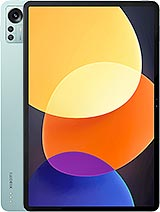
Find and download official MIUI firmware for Xiaomi Pad 5 Pro 12.4 China (dagu). All firmware files include MD5 hash verification and are available for direct download.
| Version | Method | Size | Release Date | MD5 Hash | Download |
|---|---|---|---|---|---|
| V14.0.11.0.TLZCNXM | Recovery | 4.3 GB | 2023-07-31 |
4a23a11fd2c81f5b51b3eb5a0a94634e
|
Download |
| V14.0.10.0.TLZCNXM | Recovery | 4.3 GB | 2023-07-14 |
71b38581a1d55483915d59789aa61e52
|
Download |
| V14.0.9.0.TLZCNXM | Recovery | 4.3 GB | 2023-06-12 |
9c3087856da4494ba98796513845e77c
|
Download |
| V14.0.8.0.TLZCNXM | Recovery | 4.4 GB | 2023-04-11 |
bd2974f03e6b3098e94a567376323b8b
|
Download |
| V14.0.4.0.TLZCNXM | Recovery | 4.4 GB | 2023-02-28 |
e71b15f4c67de2dcf0109bac2a68917e
|
Download |
| V13.1.7.0.SLZCNXM | Fastboot | 3.98 GB | 2022-10-24 |
19dc3af3c2f8069e18331644d77a7d78
|
Download |
| V13.1.6.0.SLZCNXM | Fastboot | 3.98 GB | 2022-09-13 |
5549d5509d4e95911cc996bce769e515
|
Download |
| V13.1.4.0.SLZCNXM | Fastboot | 3.97 GB | 2022-08-16 |
ef396bc25ce2fdfe379b3c03bb05f08b
|
Download |
| OS2.0.10.0.ULZCNXM | Fastboot | 4.27 GB | 2025-07-01 |
8b79098f43ffaf9813285dd3ffdc718f
|
Download |
| OS2.0.9.0.ULZCNXM | Recovery | 4.27 GB | 2025-06-17 |
512aaf3699719b93924bbe5d75304e0e
|
Download |
| OS2.0.8.0.ULZCNXM | Fastboot | 4.27 GB | -0001-11-30 |
eaf8e895af023702ee6218a08bfae227
|
Download |
| OS2.0.6.0.ULZCNXM | Recovery | 239.43 MB | 2025-04-15 |
da56169ee4634294c16317e93bf57907
|
Download |
| OS2.0.4.0.ULZCNXM | Fastboot | 7.86 MB | -0001-11-30 |
112aa1d54e3f298ab5f950f6821745ff
|
Download |
| OS2.0.2.0.ULZCNXM | Recovery | 1.56 GB | 2025-02-26 |
63ccc55757f3ccc5c15c669006380077
|
Download |
| OS1.0.14.0.ULZCNXM | Fastboot | 48.53 MB | 2025-01-28 |
0d0ac5d262aaa50474bfd304391edf8f
|
Download |
| OS1.0.11.0.ULZCNXM | Fastboot | 12.11 MB | 2024-12-04 |
9ba695747feff6e079f4a7843f9e7967
|
Download |
| OS1.0.7.0.ULZCNXM | Fastboot | 31.61 MB | 2024-11-01 |
02e9fddc7ba8d901c5f93bd90083c337
|
Download |
| OS1.0.4.0.ULZCNXM | Fastboot | 50.93 MB | 2024-08-09 |
0c1ca65491650c1f035491c159d9ec5b
|
Download |
| OS1.0.2.0.ULZCNXM | Fastboot | 340.15 MB | 2024-05-27 |
128408a80b08c438e0835a61cc0912b6
|
Download |
| OS1.0.1.0.ULZCNXM | Fastboot | 5.07 GB | 2024-02-22 |
c006de1ea71f338cff6e02ec39832b63
|
Download |
Xiaomi Pad 5 Pro 12.4 ; Type, IPS LCD, 120Hz, HDR10, Dolby Vision, 500 nits ; Size, 12.4 inches, 445.8 cm2 (~84.5% screen-to-body ratio) ; Resolution, 1600 x 2560 ...
| Network | Technology | No cellular connectivity |
|---|---|---|
| 2G bands | N/A | |
| 3G bands | N/A | |
| 4G bands | N/A | |
| GPRS | No | |
| EDGE | No |
| Launch | Announced | 2022, August 11 |
|---|---|---|
| Status | Available. Released 2022, August 24 |
| Body | Dimensions | 285 x 185.2 x 6.7 mm (11.22 x 7.29 x 0.26 in) |
|---|---|---|
| Weight | 620 g (1.37 lb) | |
| Build | Glass front (Gorilla Glass 3), aluminum frame, aluminum back | |
| SIM | No | |
| Stylus support (magnetic) |
| Display | Type | IPS LCD, 120Hz, HDR10, Dolby Vision, 500 nits |
|---|---|---|
| Size | 12.4 inches, 445.8 cm2 (~84.5% screen-to-body ratio) | |
| Resolution | 1600 x 2560 pixels, 16:10 ratio (~243 ppi density) | |
| Protection | Corning Gorilla Glass 3 |
| Platform | OS | Android 12, MIUI Pad 13 |
|---|---|---|
| Chipset | Qualcomm SM8250-AC Snapdragon 870 5G (7 nm) | |
| CPU | Octa-core (1x3.2 GHz Kryo 585 & 3x2.42 GHz Kryo 585 & 4x1.80 GHz Kryo 585) | |
| GPU | Adreno 650 |
| Memory | Card slot | No |
|---|---|---|
| Internal | 128GB 6GB RAM, 256GB 8GB RAM, 512GB 12GB RAM | |
| UFS 3.1 |
| Main Camera | Dual | 50 MP, f/1.8, 1/2.76", 0.64µm, PDAF 2 MP, f/2.4, (depth) |
|---|---|---|
| Features | LED flash, panorama, HDR | |
| Video | 4K@30fps, 1080p@30/60fps |
| Selfie camera | Single | 20 MP, f/2.2, 1/3.4", 0.8µm |
|---|---|---|
| Video | 1080p@30/60fps |
| Sound | Loudspeaker | Yes, with stereo speakers (4 speakers) |
|---|---|---|
| 3.5mm jack | No |
| Comms | WLAN | Wi-Fi 802.11 a/b/g/n/ac/6, dual-band, Wi-Fi Direct |
|---|---|---|
| Bluetooth | 5.2, A2DP, LE | |
| Positioning | No | |
| NFC | No | |
| Radio | No | |
| USB | USB Type-C 3.2 video output |
| Features | Sensors | Accelerometer, gyro, proximity, compass, color spectrum |
|---|
| Battery | Type | Li-Po 10000 mAh, non-removable |
|---|---|---|
| Charging | 67W wired, PD3.0, QC4, 60% in 36 min, 100% in 68 min (advertised) |
| Misc | Colors | Black, Silver, Green |
|---|---|---|
| Price | About 400 EUR |
⚠️ Warning: Flashing custom ROMs may void your warranty. Proceed at your own risk.
A: Yes, flashing official firmware is generally safe and won't void your warranty if done through official methods.
A: Recovery ROMs are flashed from recovery mode, while Fastboot ROMs require bootloader unlock and ADB tools.
A: Some devices allow downgrading, but it depends on the device and region. Check device-specific forums first.
A: If flashing fails, try using the official tool, ensure USB drivers are installed, and check device compatibility.





